
Download
Install TuckGem.
One installer for Windows 10 and 11 (64-bit). Install it over an earlier version and your licence key, accounts and backups stay where they are.
The installer
FileTuckGem-Setup.exe
Version—
Size—
Download TuckGem for Windows
The download link is being set up. The link in your licence email works as soon as it is live, and [email protected] can send you the file.
SHA-256 of the installer, to check your download if you want to:—
Checksum file
Three steps
- 1. Run the installer. Windows shows the box below because the installer is new and not yet widely known. Click More info (the small link under the text) and the Run anyway button appears next to Don't run. The installer needs no administrator rights.
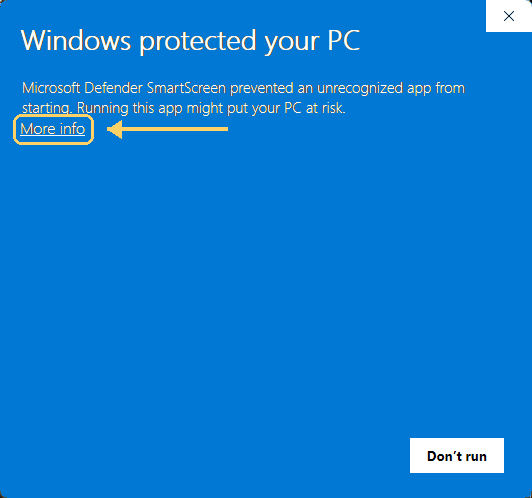
What every customer sees the first time. Click More info, then Run anyway. - 2. Paste your licence key. It is in the email you received after paying and starts with
CV1.TuckGem checks it on your computer. - 3. Connect your Telegram account. Enter your phone number and the code Telegram sends you, pick the chats to keep, and press Start backup.
- Backups are saved on your own computer, in a folder you choose.
- Content with Telegram's “Restrict saving content” turned on and Secret Chats can't be backed up — see what TuckGem can and can't do.
Stuck? Write to [email protected] with your Windows version and what you saw on the screen.